AI TOOL / #03074
VisualizeAI
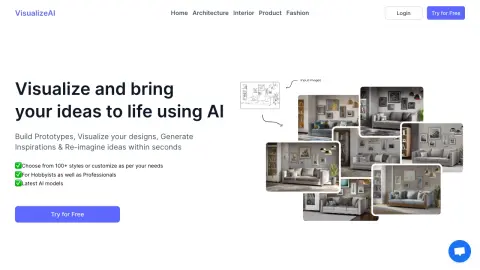
Artificial intelligence tools convert wireframe diagrams into realistic 3D renderings, thereby enabling efficient design visualization.
Introduction
AI tool converting wireframes into realistic 3D renderings for efficient design visualization.
What is VisualizeAI?
VisualizeAI is an artificial intelligence-based tool that enables the conversion of wireframe diagrams into rendered images, providing realistic and accurate visual representations of design concepts. It accelerates design iteration processes, enhances communication with stakeholders, reduces errors and rework, thereby improving overall design efficiency. This tool utilizes advanced algorithms and machine learning techniques to analyze wireframe diagrams and generate highly detailed 3D renderings that take into account factors such as lighting, materials, and textures.
How to use VisualizeAI?
1. Upload the image you wish to process (sketch, photo, etc.).
2. Configure the output settings (style, color, theme).
3. The result will be ready in just a few seconds.
The core functions of VisualizeAI
Conversion from wireframe to rendered image
Highly realistic 3D rendering results
Custom style options (over 100 different styles available)
Visual storage and accessibility
Related
SidekickSpace
SidekickSpace utilizes client-side masking technologies to ensure that sensitive data is not accessed by artificial intelligence systems.
Your AI-Powered Movie Companion
An AI-powered movie assistant that provides plot, cast information, facts and movie recommendations.
HeyLuna.ai
An AI virtual assistant with long-term memory, designed for use in daily tasks and application integration.
Gene
Gene is a free AI assistant extension for summarization, translation, and other tasks.
TrailMate
An offline AI assistant for outdoor safety and guidance.
Macaify – Make your Mac-AI-fy
Macaify integrates ChatGPT into any Mac app to boost productivity with keyboard shortcuts.