AI TOOL / #03966
OneClick AI
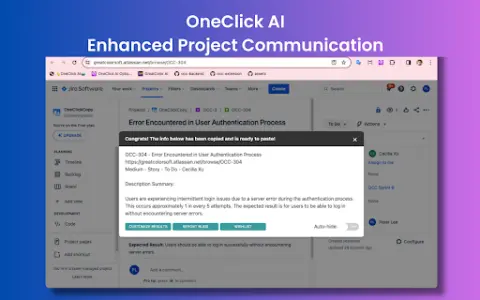
OneClick AI simplifies workflows by allowing users to extract and summarize content with just one click.
Introduction
OneClick AI streamlines workflows by extracting and summarizing content with a single click.
What is the OneClick AI Chrome extension/plugin?
OneClick AI is a tool designed to streamline workflows by enabling one-click extraction and summarization of content. It enhances productivity in areas such as project management, cross-team collaboration, personal research, and information sharing. The tool allows users to customize the appearance of the results, and all extracted data is immediately copied to the clipboard for further use.
How to use the OneClick AI Chrome extension/plug-in?
You can activate OneClick AI by clicking on the expansion icon in the toolbar, right-clicking to open the context menu, pressing the shortcut key, or right-clicking on the expansion icon in the toolbar.
The core functionality of the OneClick AI Chrome extension/plug-in
One-click extraction and summarization of content
Multilingual summary
The result is automatically copied to the clipboard.
Related
AudioGenius.ai
An AI-powered voice cloning and translation platform designed to transform voices and facilitate communication on a global scale.
Translate This Video
Video translation and dubbing services, using voice cloning technology.
Deepdub
An AI-powered dubbing and localization platform designed for efficient audio production.
EchoVoiceAI
Voice cloning and sound design applications are used for cloning, imitating, and creating new sounds.
ImageGPT
An integrated AI platform for image generation, enhancement, and editing.
CopyCoder
CopyCoder generates AI prompts based on images, enabling faster development of applications.