AI TOOL / #04050
AI Roundtable
Ask a question and receive answers from multiple AI assistants.
Introduction
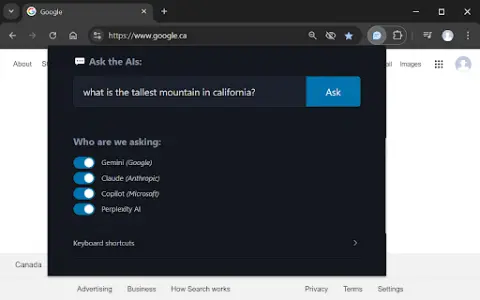
Ask one question, get answers from multiple AI assistants.
What is a Multiple AI Assistants Chrome extension/plug-in?
This website allows users to submit questions at once and receive answers from multiple AI assistants. Users can customize which assistant they want to use for their queries. The website also provides keyboard shortcuts, making it easy to access various functions quickly.
How to use the Multiple AI Assistants Chrome extension?
Use the shortcut keys Ctrl/Cmd + Shift + Q to open the query window and start typing your question. Use Alt + 1 to switch to Gemini, Alt + 2 to switch to Claude, Alt + 3 to switch to Copilot, and Alt + 4 to switch to ChatGPT.
The core functions of various AI Assistant extensions/plugins for Chrome.
Query multiple AI assistants simultaneously
It is possible to customize the selection of AI assistants.
Convenient and fast keyboard shortcuts
Related
Monkt
Monkt converts documents to AI-friendly Markdown or JSON for integration with AI/LLM.
Narralize
Narralize uses artificial intelligence to convert PDFs into multilingual audio summaries.
Summarize and Translate with Gemini
Use Gemini AI to summarize and translate web pages with just one click.
YouTube Real Time Translation
Real-time translation of YouTube videos.
Loro – Aprende nuevas palabras
Loro is a browser extension that enables seamless language learning through automatic word translation.
Scan Translator
Use AI to instantly translate raw comics, scans, or images into over 50 languages.