AI TOOL / #04208
Shift-Ctrl-F: Semantic Search for the Browser
A Chrome extension that uses MobileBERT to search for and highlight answers on web pages.
Introduction
Chrome extension using MobileBERT to search and highlight answers on webpages.
What is the Shift-Ctrl-F Chrome extension/plugin?
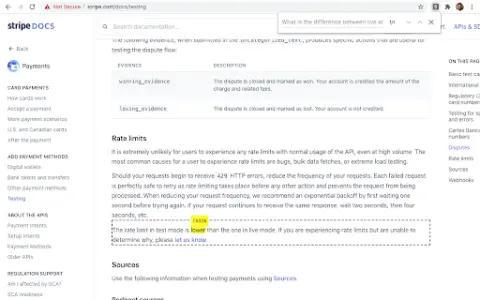
Shift-Ctrl-F is a Chrome extension that utilizes the MobileBERT model, which has been fine-tuned using the SQuAD dataset. This extension uses TensorFlowJS to search for answers on web pages and identify relevant elements. It allows users to enter natural-language queries and find corresponding answers within the content of the current page.
How to use the Shift-Ctrl-F Chrome extension/plugin?
1) Open the extension pop-up window using the toolbar or shortcut key (Shift-Ctrl-F).
2) Enter your natural language query in the search box.
3) Press Enter and wait for the model to return the results.
The core functionality of the Shift-Ctrl-F Chrome extension/plug-in.
Conduct natural language question-and-answer interactions on web pages.
Highlight relevant elements based on the search query.
Efficient processing using MobileBERT
Related
Takes
Claude Code helps you edit and produce videos.
Base44
Conversational application building platform under Wix
Kudos
An AI wallet that automatically selects the most cost-effective credit card.
kōdlo
An AI-powered sales platform that assists from identifying potential customers to drafting development proposals.
OpenScreen
An open-source, free screen recording and editing tool that can be integrated with AI agents for video processing.
Inteldo
Eight AI analysts conducted concurrent research on business-related issues.