AI TOOL / #06136
Ask Screenshot for Gemini
Improve productivity by integrating screenshot and text analysis with Gemini.
Introduction
Enhances productivity by integrating screenshot and text analysis with Gemini.
What is the Ask Screenshot AI Chrome extension/plug-in?
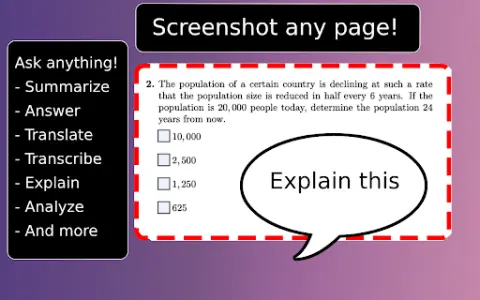
Ask Screenshot is a tool designed to enhance productivity by directly integrating screenshot and text selection analysis with Gemini. It enables users to quickly capture screenshots or select text, and then use Gemini to perform tasks such as summarizing, transcribing, interpreting, translating, or carrying out other operations based on predefined or customizable templates.
How to use the Ask Screenshot AI Chrome extension/plug-in?
To use “Ask Screenshot”, simply right-click on any page and hover over “Ask Gemini” to access the available screenshot templates. For selecting text, right-click on the desired text and hover over “Ask Gemini” to view the available templates.
Explore the core features of the Screenshot AI Chrome extension/plug-in.
Take a screenshot and perform analysis: After capturing the screenshot, Gemini will automatically be used to conduct the analysis.
Select and analyze text: Right-click on any selected text to automatically have Gemini perform the analysis.
Related
Framed – Art Audio Guide
AI-powered art guided tour applications that help users learn about artworks and their creators.
OurBabyAI
AI-generated baby tool that creates images of future children based on photos of parents.
Chatty: AI Assistant
Chatty is an AI assistant powered by GPT models, designed for writing and answering questions.
Cohesive AI
An AI-driven content creation platform that enables convenient content generation and editing.
Cirql
An AI-based platform that automates business tasks and manages emails.
Scrip AI
Free AI writing tool for creating viral short video scripts and AI content.