AI TOOL / #06524
Speak based on Azure Speech
Text-to-speech extension using Azure Speech with support for multiple languages and Chrome live subtitles.
Introduction
Text-to-speech extension using Azure Speech, supports many languages and Chrome Live Caption.
What is Azure Speech TTS Extension ai chrome extension/plugin?
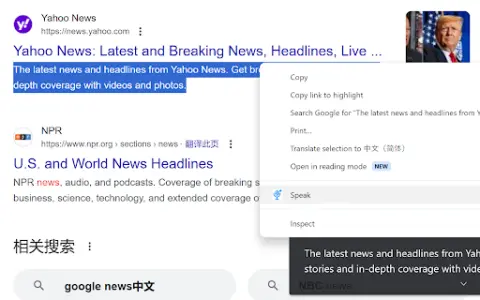
This is a text-to-speech (TTS) extension that leverages the Azure Speech service to convert selected text to audio. It supports multiple languages and integrates with Chrome's Live Subtitles feature for enhanced accessibility. Users need to configure the extension using their Azure Speech Service API key to enable TTS functionality.
How to use Azure Speech TTS Extension ai chrome extension/plugin?
Install the extension, configure it with your Azure Speech Service API key, select text on a web page, and use the extension to play audio for the selected text. Audio playback will be based on the selected language and voice settings.
Core features of Azure Speech TTS Extension ai chrome extension/plugin
Text-to-speech using Azure Speech Service
Support multiple languages
Integrate with Chrome Live Subtitles
Configurable voice settings
Related
OneAudio AI
An AI platform used for summarizing audio content, transcribing it, and converting it into notes.
Bubbles – AI Meeting Notes & Screen Recorder
A free screen recording tool along with AI-based meeting note-taking features, designed to facilitate action-oriented conversations.
Sonnet
AI meeting assistant and note-taking tool with automated CRM and meeting bot-less capabilities.
Vemo AI
An AI-powered assistant for taking notes during face-to-face meetings, which generates summaries and action items.
AutoCut
An AI plug-in for Premiere Pro and DaVinci Resolve to automate video editing tasks.
GistReader
An AI-powered online reader designed to summarize articles and remove any distracting elements.