AI TOOL / #06709
Serenade for Chrome
A voice-controlled tool for coding and web navigation.
Introduction
Voice-controlled coding and web navigation tool.
What is the Serenade AI Chrome extension/plugin?
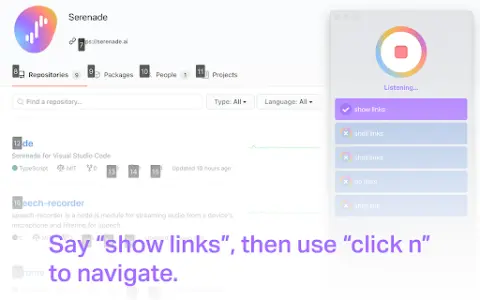
Serenade is a tool that lets users write code and browse the web using voice commands without typing. Serenade’s Chrome extension brings this capability to the browser, enabling users to control tabs, navigate pages, and enter text in editable fields using only their voice. It requires installing the Serenade local app, which is currently available on Windows, macOS, and Linux.
How do I use the Serenade AI Chrome extension/plugin?
Install the Serenade desktop app and Chrome extension. Once installed, use voice commands to navigate web pages, manage tabs, and enter text in editable areas—no mouse or keyboard required.
The core features of the Serenade AI Chrome extension/plugin
Voice-controlled web navigation
Voice-Controlled Coding
Manage tabs with voice commands
Use voice commands to enter text in editable areas.
Related
AI EDU
An AI chat tool that supports custom APIs, image processing features, and advanced writing tools.
AnyText AI
An AI tool designed for the high-precision generation and editing of text within multilingual images.
Molku Ai – Autofill PDFs in Seconds by Transferring Data from Another Docs
Molku utilizes artificial intelligence to automate document conversion and data transfer.
EaseUS ChatPDF
An AI tool that allows you to chat with PDF files and generate summaries for free.
Getaudify
An AI Chrome extension designed for summarizing text, converting text to speech, providing answer-based services, and performing content analysis.
PhotoSolve – Scan & Solve Any Question
A Chrome extension designed for instant problem-solving, utilizing AI and OCR technologies.