AI TOOL / #06738
Chat GPT Logger
An extension tool used to save ChatGPT conversations as local text files.
Introduction
Extension to save ChatGPT conversations to a local text file.
What is the GPT Chat Logger AI Chrome extension/plug-in?
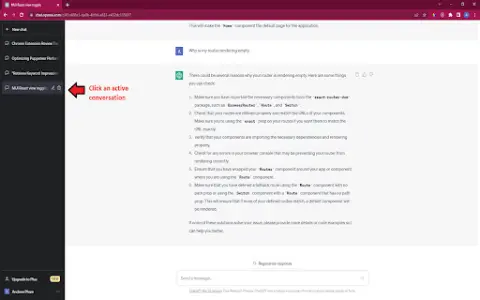
The GPT Chat Recorder is an extension that allows you to save active conversations from Chat GPT as text files on your computer. All you need to do is click on an ongoing conversation, then click the save icon, and finally save the file to your device. These steps are also illustrated in the image provided.
How to use the GPT Chat Logger AI Chrome extension/plug-in?
Click on an active conversation within ChatGPT, select the save icon, and then save the file to your computer.
The core functionality of the GPT Chat Logger AI Chrome extension/plug-in
Save the ChatGPT conversation as a local text file.
Related
Jetpack AI Assistant
WordPress plugins designed to enhance security, performance, growth potential, and facilitate AI-assisted content creation.
Monica AI
Chrome extension: An AI assistant for tasks such as chatting, writing text, and translating content.
Dystr
An engineering analysis platform for writing and executing code in the cloud.
OmniChat
An AI agent platform designed for business automation and enhancing customer experiences, integrating a variety of AI models.
Aphid
By using an AI-driven automation platform, you can save time and generate revenue through digital clones.
COHEZION.AI
An AI-powered community data platform for game development, error reporting, and feedback analysis.