AI TOOL / #07462
Vision AI
A Chrome extension that enables AI-driven insights based on screenshot data.
Introduction
Chrome extension for AI-powered insights from screenshots.
What is a Vision AI Chrome extension/plug-in?
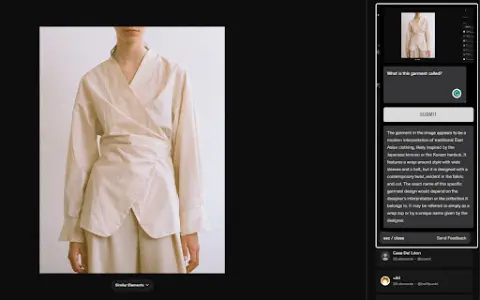
Visual AI is a Chrome extension that combines screenshot functionality with AI-driven insights to enhance online information search. It allows users to capture any portion of a web page, add notes or questions, and receive AI-generated responses based on the context of the captured image.
How to use the Vision AI Chrome extension/plug-in?
Install the Visual AI Chrome extension. Use CTRL + SHIFT + Y to take a screenshot, and then add any notes or questions you have. Visual AI will analyze the screenshot and provide an AI-generated response.
The core functions of the Vision AI Chrome extension/plugin
Screenshot capture
Interactive AI Suggestions
Seamless browser integration
Suitable for a wide range of applications in various fields
Privacy and Security
Related
Voiceflow ai
Voiceflow is a conversational design platform for building and deploying AI assistants.
Insighto.ai
Artificial intelligence-powered phone and chat assistants provide automated customer interactions and support.
Haiva
An AI platform that enables the creation of multilingual voice agents for use in sales and customer interactions.
Auro: AI Social Post Assistant
An artificial intelligence assistant that converts voice memos into organized content for creators.
Aurora AI
Platforms for building AI infrastructure, including natural language question-answering systems and community collaboration tools.
Phonely
Provide enterprises with AI-powered response services to enhance customer communication and expand support capabilities.