AI TOOL / #08846
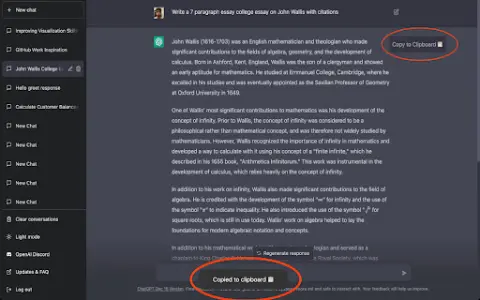
Copy for Chat GPT
An extension used to copy ChatGPT responses and check for plagiarism.
Introduction
Extension to copy ChatGPT responses and check for plagiarism.
What is the Plagiarism Detector Extension for Chrome – an extension/plug-in for Google Chrome?
This extension allows you to copy the responses generated by ChatGPT by clicking a button or using the CMD+K shortcut key, and then have those responses checked by plagiarism detection tools.
How to use the Plagiarism Detector Extension for Chrome?
You can use this extension by clicking the copy button on ChatGPT’s response or by pressing CMD+K. The copied text will be automatically checked to determine whether it contains any plagiarized content.
The core functionality of the Plagiarism Detector Extension for Chrome.
One-click to copy the response from ChatGPT
Use the CMD+K shortcut key to copy.
Automatic plagiarism detection
Related
aabo
Digital health platforms offer AI-powered medical devices for personalized healthcare.
Peak AI: Your Intelligent Gym Partner
An AI-powered workout planning and fitness tracking tool that provides a personalized fitness experience.
BetterBody
A nutrition app that offers personalized meal plans, food tracking features, and the services of an AI-based nutritionist.
Calorio
Calorio is a voice-activated calorie-tracking app that is powered by artificial intelligence.
Calorielens: Calorie Tracker
Calorielens is an app that uses AI to analyze photos of meals in order to calculate their calorie content.
AiRunner
Running apps powered by artificial intelligence offer personalized training plans and real-time feedback.