AI TOOL / #08916
Kolya_extension
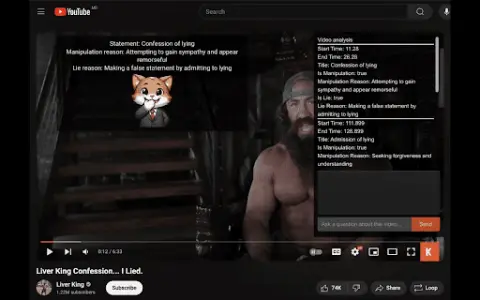
Chrome extensions use large language models to analyze the manipulations and deceptions present in YouTube transcripts.
Introduction
Chrome extension analyzes YouTube transcripts for manipulations and lies using LLM.
What is the YouTube Transcript Analyzer AI Chrome extension/plug-in?
This Chrome extension utilizes large language models to analyze the transcripts of YouTube videos, identifying manipulative statements and lies. It will display a overlay on YouTube videos that provides detailed information regarding the claims made in those videos.
How to use the YouTube Transcript Analyzer AI Chrome extension?
Install the Chrome extension. Navigate to the YouTube video. The extension will automatically analyze the transcript and provide a overlay displaying information related to what is stated in the video.
The core functionality of the YouTube Transcript Analyzer AI Chrome extension/plug-in
Use LLMs to analyze the manipulation and deception present in YouTube video transcripts.
Provide overlay information on YouTube videos that offers detailed details about the content being presented.
Related
PDF Online Toolkit
A free and easy-to-use online PDF tool that offers a total of 24 features for editing PDF files directly online.
Ma Xiaobang's Blog
Ma Xiaobang’s Blog is a personal website dedicated to sharing internet-related experiences. The blogger uses easy-to-understand articles to introduce a wide range of high-quality software and online tutorials to everyone. (Ma Xiaobang: Of course, I should give myself some praise!) Scan the QR code to follow its WeChat official account.
New BaseTab AI
AI-powered new tab workspace for browsers
The new GPT Image Hub
A database containing over 30,000 AI-generated image prompt templates
New Enclave
The notch on the Mac has evolved into an AI-based status panel.
New Verli
Real-time two-way translation for meetings and calls